


Email is a big part of our everyday life, so having more than one email address is standard. Maybe you have a couple of Gmail accounts or use different providers—like Outlook for work and Gmail for personal stuff. Managing all these emails can get overwhelmingly fast. That’s why today we’re here to show you the best free app for managing multiple email accounts!
Having the right tool to bring all your email accounts together in one place can save you a lot of time and hassle. No more jumping between tabs or apps! In this post, we’ll introduce you to Unified Workspace, an app that makes managing multiple emails super easy.
Unified Workspace: The Best Free App for Managing Multiple Email Accounts
Unified Workspace is a workspace simplifier that lets you keep all your apps in one place. Whether it’s your email accounts or other apps you use daily, Unified Workspace combines them into one convenient hub. Plus, Unified Workspace offers a free version – Unified Workspace Basic- that allows you to manage as many apps as you want, along with a range of other useful features.
Let’s dive into how the free version of Unified Workspace can help you easily manage all your email accounts and simplify your workflow!
Multiple apps all in one place
One of the best things about Unified Workspace is that it lets you add as many apps as you want to your main menu, as long as they’re different apps. But here’s the cool part: even if you need multiple instances of the same app, like Outlook or Gmail, you can add up to two of each in the Basic plan, and unlimited instances in Pro. This is perfect if you need to handle multiple email accounts.
If you’ve got two Gmail accounts—one for personal use and one for work—Unified Workspace is a great solution. Especially since Gmail doesn’t offer an official desktop app for PC, Unified Workspace makes it super easy to treat Gmail like a desktop app. No more switching between browsers or tabs!
It also works wonderfully if you use more than one email provider. It’s pretty common to have a mix of email accounts—maybe two Gmail accounts, one Outlook, and one Apple Mail. With Unified Workspace Basic, you can have two apps for each email provider, all in one place. This makes it a breeze to stay organized. You’ll no longer need to keep track of many open windows or hunt through tabs in your browser to find the right account. Everything is easily accessible from a single interface.
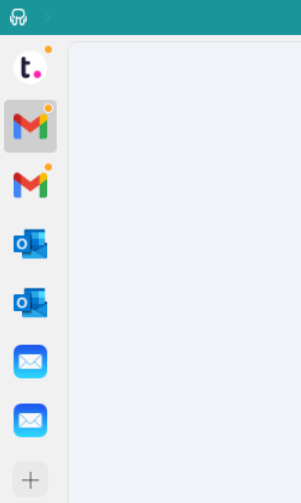
Plus, organizing all your apps is a snap. Unified Workspace lets you arrange them however you like using a simple drag-and-drop method. This makes keeping your workspace neat and tailored to your needs super easy.
Notification management
With Unified Workspace, you’re in complete control of how and when you receive notifications for your email accounts. Imagine having a personal assistant who understands exactly how you want to stay updated—that’s what Unified Workspace provides!
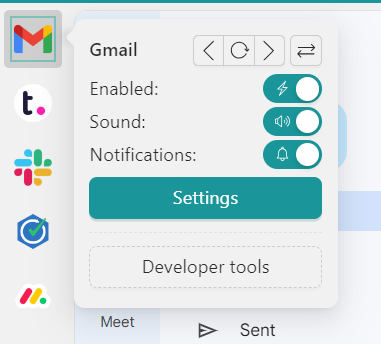
You can easily customize your notification settings to match your preferences, allowing you to stay connected without feeling overwhelmed by constant alerts. If you’re trying to focus during critical work hours, simply right-click on any email account in Unified Workspace to choose whether to receive alerts with sound, mute them, or turn them off completely.
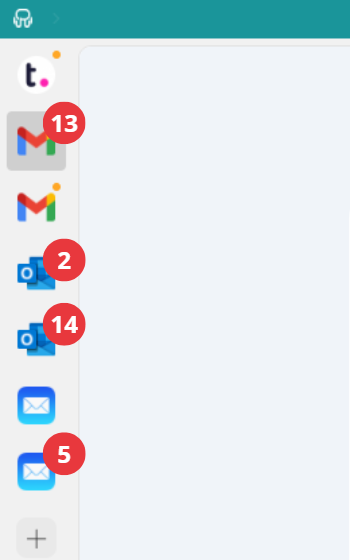
Moreover, Unified Workspace makes managing your emails easier by displaying notifications as counters in the app. This way, you can quickly glance at the number of new emails in each account.
Focus Mode
Need a moment of calm to dive deep into your tasks without constantly checking your emails? Unified Workspace has the perfect solution: Focus Mode.
When you activate Focus Mode, you create a personal bubble that keeps distractions at bay. This feature pauses all notifications, allowing you to fully concentrate on your work without interruptions from your email accounts or other apps.
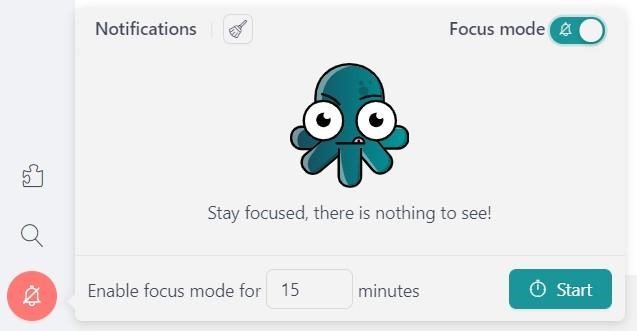
But don’t worry about missing anything important! While Focus Mode is active, all notifications are safely stored in the Notification Center. Once you’re ready to take a break or switch tasks, you can easily catch up on what you missed.
That’s why Unified Workspace is the best free app for managing multiple email accounts!

Need to manage more than 2 accounts from the same email provider?
Now that we’ve seen how Unified Workspace Basic is the best free app for managing multiple email accounts, let’s take a look at Unified Workspace Pro and why it’s the best-paid option for those who need to manage three or more accounts from the same email provider.
Unlimited instances for app
With Unified Workspace Pro, you can add as many apps as you want, and there’s no limit on how many instances of the same app you can have. This is perfect if you need to manage multiple email accounts because you won’t be stuck with just 2 instances.
For instance, if you have more than four Outlook accounts, Unified Workspace Pro allows you to set them all up easily, along with any other apps you use, all in one convenient place.
Unified Workspace workspaces
Unified Workspace Workspaces are virtual folders that allow you to group your apps by category, client, or whatever organizational method works best for you. This feature is particularly helpful if you manage multiple email accounts. For example, you can create a separate workspace for each email provider—like Gmail, iCloud Mail, Outlook, or ProtonMail—and easily store all your accounts in one place.
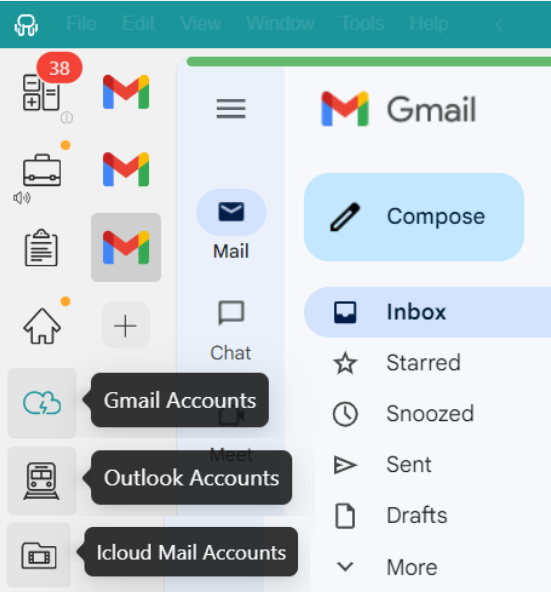
Another example: Let’s say you want to keep your personal and professional emails organized. You could set up one workspace for personal use, including three Gmail accounts and one Outlook account. Then, you could create another workspace for your corporate needs, including two Gmail accounts, four Outlook accounts, and one ProtonMail account.
This way, you can quickly access the accounts you need without getting lost in a jumble of apps. Unified Workspace Workspaces help streamline your workflow, ensuring everything is neatly categorized and readily available whenever required.
Session management
When juggling multiple email accounts, keeping track of your logins can get tricky. That’s where Unified Workspace’s Session Management comes in to make your life easier. With Unified Workspace, you can forget the hassle of constantly logging in and out of each app.
This feature uses Profiles to simplify things. Each profile acts like a separate session, allowing you to organize all your different email addresses and logins in one convenient place. You can choose from five types of profiles: Primary, Inherit from Workspace, Private, Incognito, and Custom.
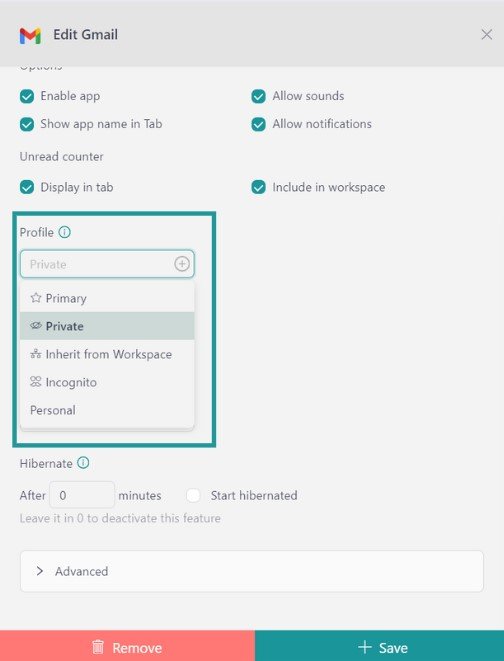
This means you can easily switch between your personal and work email accounts or any other accounts you manage without remembering which login belongs to which app. Unified Workspace’s Session Management saves you time and keeps your email accounts neatly organized, making it a breeze to stay on top of your communications.
In a nutshell, Unified Workspace Basic is the best free app for managing multiple email accounts. It makes it super easy to stay organized and on top of your emails. If you need even more features, Unified Workspace Pro is the way to go, offering unlimited options to enhance your email management.
How to add email apps to Unified Workspace?
Adding email apps to Unified Workspace is super simple! Just follow these easy steps to get your accounts set up and ready to go:
- Click on “+ Add an app or workspace“.
- Search for your email provider: To find your email provider, you can either type its name in the search bar or select the Email category.
- Customize your app settings: Before adding the app, you can customize various settings to your liking. Decide if you want to receive OS notifications, enable app sounds, assign a specific profile, and explore other options that Unified Workspace offers.
And Voilà! After you’ve set everything up, you’re all set to use the email app from your desktop without opening your browser.
With these simple steps, you can easily manage all your email accounts in one place with Unified Workspace!
The best part? You can try Unified Workspace Pro for free for 30 days—no credit card, no strings attached, and no hassle! So why not give it a shot?
Experience the ease of managing all your accounts in one place!