


In today’s fast-paced world, effective personal communication and organization are essential for staying on top of our busy lives. With so many communication channels and apps available, keeping track of everything and staying organized can be challenging. Fortunately, there are tools available that can help simplify the process.
In this post, you will find out why Unified Workspace is the perfect tool for communication and organization.
Personal communication and organization needs
Effective communication and organization play critical roles in our daily lives. Communication enables us to connect with others, establish relationships, and share ideas, while organization helps us manage our time, tasks, and responsibilities.
However, many people need help with these aspects of their lives due to the proliferation of communication channels and multiple apps and tools. This complexity can result in a cluttered and disorganized digital environment, making keeping track of messages, emails, and tasks challenging.
Moreover, it cannot be easy to prioritize and manage tasks effectively, leading to missed deadlines and reduced productivity. These challenges can cause stress and overwhelm, making it hard to successfully manage personal and professional lives.
Therefore, it’s crucial to have tools that simplify communication and organization, enabling us to stay focused and productive. The following section will explore how Unified Workspace can help address these challenges and enhance communication and organization efficiency.
Benefits of an organized desktop
An organized desktop can offer numerous benefits, such as:
- Improved productivity: When your desktop is clutter-free and well-organized, you can quickly find the files and applications you need, allowing you to work more efficiently.
- Reduced stress: A cluttered desktop can be overwhelming and make you feel stressed or anxious. An organized desktop can help create a sense of calm and order, reducing stress levels.
- Better focus: An organized desktop can help you focus on your tasks by reducing distractions. When you only have the necessary files and applications on your desktop, you are less likely to get sidetracked by other things.
The benefits of effective personal communication
The benefits of effective personal communication are numerous and can positively impact various aspects of your life:
- Build stronger relationships: When you communicate effectively, you build stronger connections with others, whether with family, friends, or colleagues.
- Avoid misunderstandings: Good communication helps to avoid misunderstandings, which can lead to conflict or confusion.
- Resolve disputes: Effective communication helps to resolve conflicts by allowing individuals to express their concerns and find common ground.
- Increase productivity: Clear communication can improve productivity by ensuring everyone understands their roles and responsibilities.
- Enhance teamwork: Effective communication is essential for successful collaboration, allowing team members to work together towards a common goal.
- Improve decision-making: When you communicate effectively, you can gather and exchange information, enabling you to make better-informed decisions.
- Boost confidence: Effective communication can help to boost your confidence and self-esteem, as you can express yourself clearly and confidently.
- Expand opportunities: Strong communication skills can open new possibilities in personal and professional settings.
Why is Unified Workspace the perfect tool?
Unified Workspace is the ultimate tool for communication and organization in the digital environment, whether for personal or professional use. With the ever-increasing number of communication apps available, keeping them all in check can be challenging.
Unified Workspace is a workspace simplifier designed to help you manage those multiple communication channels and apps efficiently, saving you time and improving your productivity. Unified Workspace is an all-in-one solution that lets you centralize your applications, customize your workspace, and improve collaboration. Also, Unified Workspace offers a range of features that can streamline communication workflows and promote a better organization.
Let’s examine which Unified Workspace features are specially designed to improve your organization and communication.
Apps library
With more than 700 compatible applications, you can centralize all your essential tools. This streamlines your workflow and facilitates the organization and effective communication with your team. Instead of jumping between different applications and tools, you can access everything from one central location. This saves time and reduces the risk of missing important messages or deadlines.
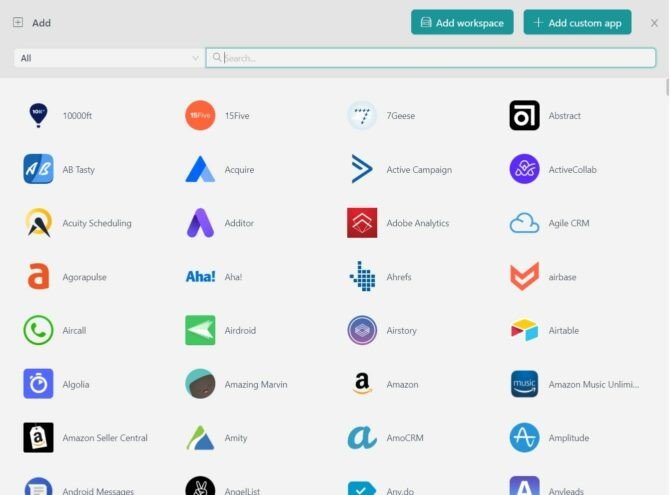
Adding apps to your workspace in Unified Workspace is effortless. You can create a new workspace or add applications to an existing one by searching for the application name in the search bar. Once you find the application, you can configure it according to your preferences, ensuring you have all the tools needed to stay on top of your tasks.
Customizable workspaces
Unified Workspace is an effective tool that can significantly enhance organization and communication in the digital realm. Given the vast array of available communication apps, it is often challenging to manage them all efficiently, leading to the loss of important conversations and inefficiencies.
One of the key features that set Unified Workspace apart is its customizable workspaces. This feature enables users to group applications by category and arranges them in a manner that aligns with their specific needs. This way, you can differentiate your work and personal applications quickly and efficiently. By doing so, users can access the relevant media required for communicating with colleagues, customers, and partners, ultimately enhancing their communication efficiency.
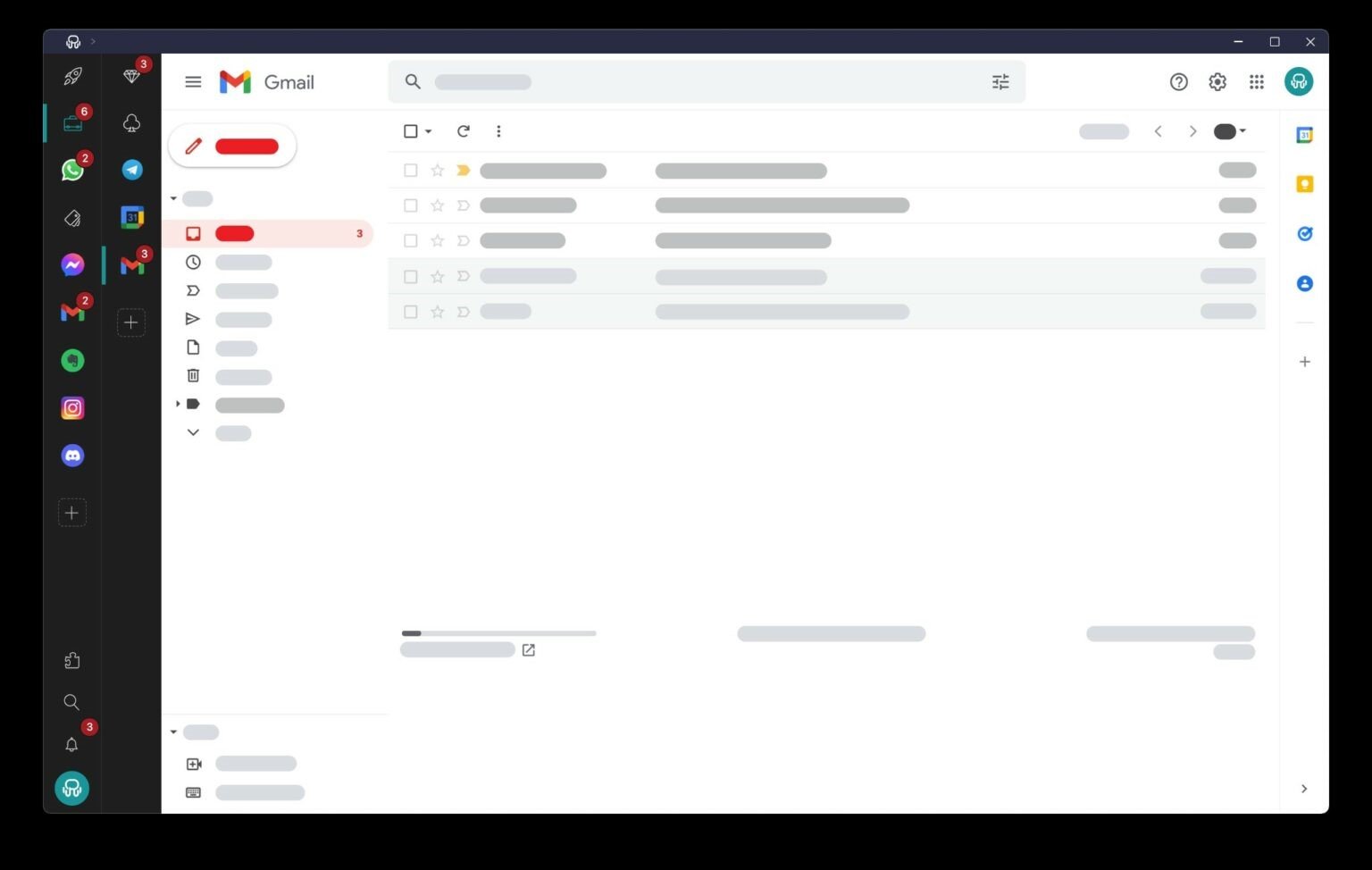
Furthermore, Unified Workspace offers customizable layouts, allowing users to display applications most appropriate for their needs. With a variety of predefined layouts to choose from, users can select horizontal or vertical channels depending on their preferences. By doing so, users can easily access the required information, ultimately promoting a better organization on their desktops.
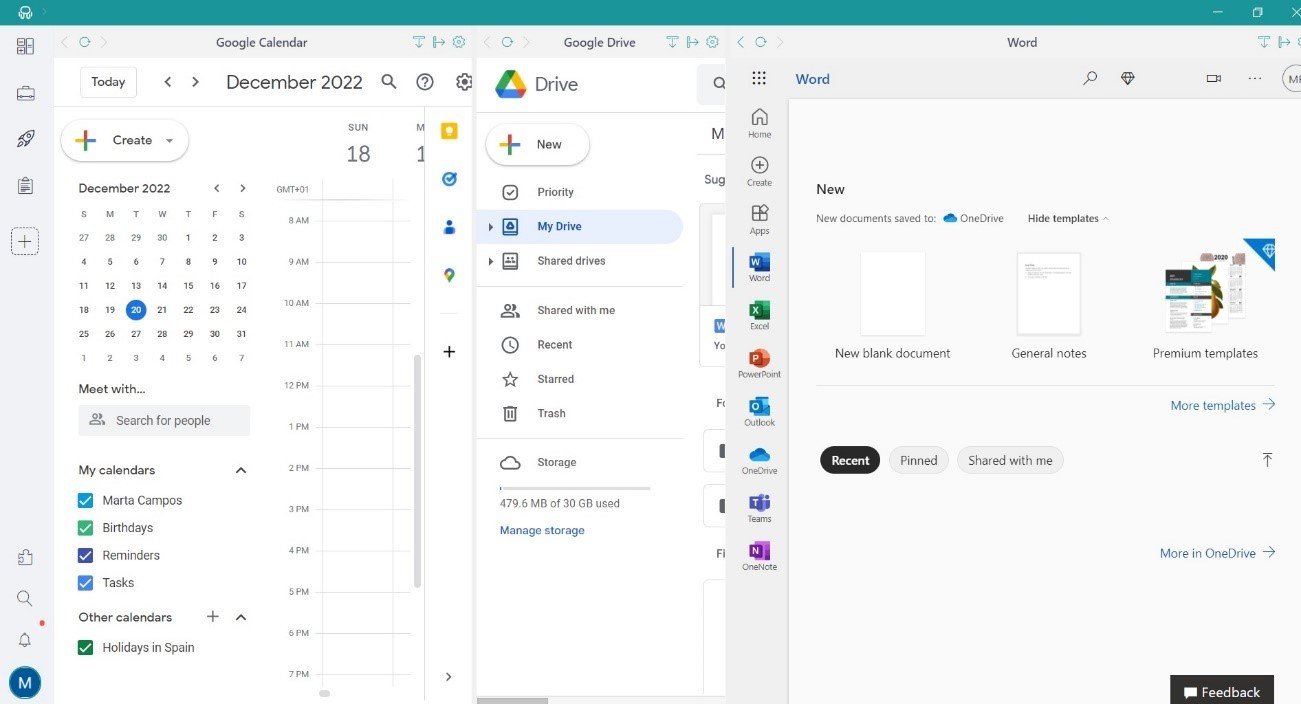
Session management and Profiles
Unified Workspace offers session and profile management to simplify the use of communication applications and eliminate the need for constant logging in and out of different accounts. With Unified Workspace, you can create multiple workspaces with different login credentials, allowing you to access various email addresses and services within one platform. For instance, you can set up a workspace with all your personal applications using your personal email credentials.
With Unified Workspace’s session-sharing feature, you can log in once and access multiple accounts from the same service. Unified Workspace provides three main profiles: Primary, the default profile; Workspace Inherit, which applies only to nested items; and Private, which is an isolated session. You can add more profiles by clicking on the plus sign.
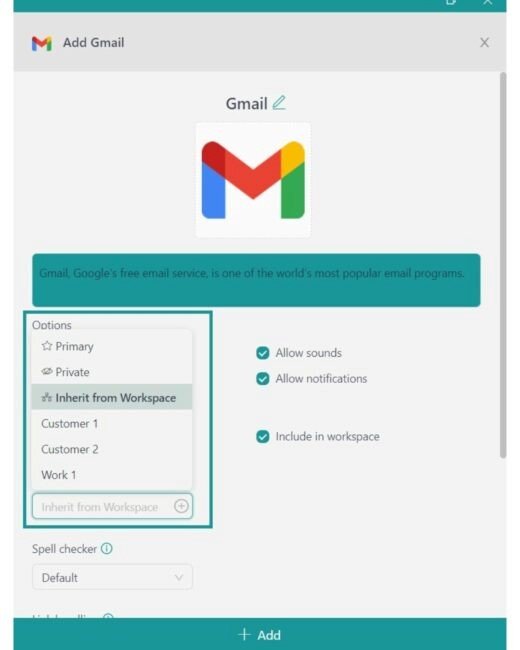
By creating a workspace-specific profile, you can log in to Gmail with your work credentials and assign that profile to other Google applications within the same workspace. You can also set up a profile scheme for all applications within a personal space or use a specific profile or private session for each nested application. This feature makes managing multiple accounts more efficient and straightforward.
Notification management
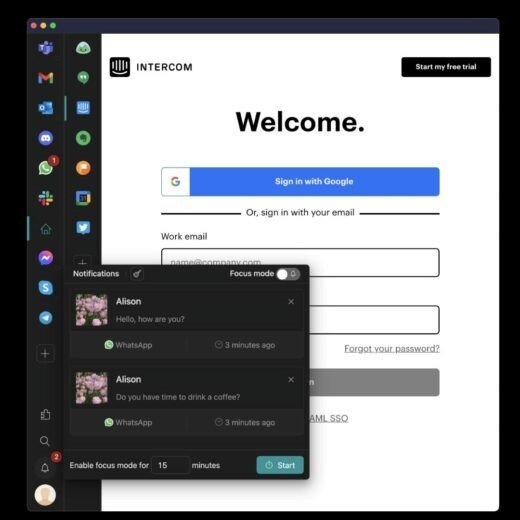
Maintaining order and staying connected in a digital environment can be challenging, especially when dealing with multiple communication apps. Unified Workspace lets you control your notifications and customize them according to your preferences. You can receive desktop notifications, sound alerts or even turn off notifications for specific workspaces or applications.
If you mute notifications, you won’t miss any critical information. Unified Workspace stores all notifications, allowing you to catch up on missed messages at a later time. Additionally, Unified Workspace visually highlights unread messages or emails from each app, providing a quick overview of where your attention is most required. By utilizing these features, Unified Workspace helps you stay up-to-date while preventing unnecessary interruptions and distractions.
Quick Search
Unified Workspace includes a quick search function that significantly enhances personal communication productivity and efficiency. This feature lets you rapidly switch between different applications and efficiently respond to messages, emails, or documents. You can easily access Quick Search from the main menu or the keyboard shortcut Alt+Shift+K.
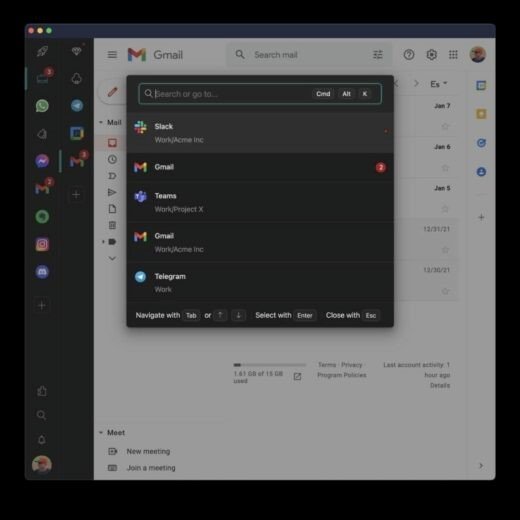
Moreover, the quick search feature in Unified Workspace also enables you to search for specific files or conversations within applications, saving valuable time that would otherwise be wasted searching for essential documents or past conversations with colleagues. By simply typing in the name of the file or person you are looking for, Unified Workspace will instantly display the relevant information. This convenient feature provides quick access to the information you need, which helps you stay organized and focused on the task at hand, ultimately leading to improved productivity.
Keyboard shortcuts
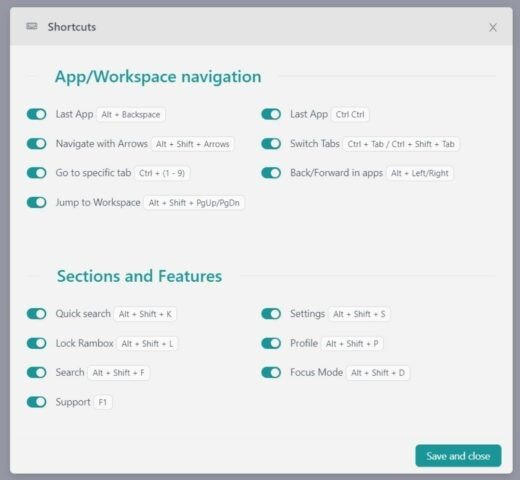
Unified Workspace can also enhance your communication experience with its keyboard shortcuts.
These shortcuts enable you to access applications and their tools with ease quickly. With various key combinations, such as navigation shortcuts for switching between applications (e.g., “CTRL CTRL” for the last application) and function-specific combinations like Quick Search (ALT + SHIFT + K) and focus mode (ALT + SHIFT + D), Unified Workspace’s keyboard shortcuts can help you save time and improve your productivity when using messaging and communication applications.
Now that you know how Unified Workspace functionalities and features can help you improve personal communication and organization, download Unified Workspace, configure it to your liking, and enjoy all its advantages as soon as possible.
If you have questions about Unified Workspace features, don’t hesitate to contact us!